Category: Uncategorised

  • Let Bank Feeds & Open Banking do the hard work for you

    Let Bank Feeds & Open Banking do the hard work for you

    Hello, everyone! Craig here, Client Success Manager here at Resident. I am back to share more information regarding using Bank Feeds via Open Banking to increase accuracy and efficiency within your team.

    Let’s dig in…

    Tired of Manual Transaction Entry? Discover the Power of Resident Bank Feeds

    Let’s face it, manually entering bank transactions is time-consuming and prone to errors. But with Resident’s Bank Feeds feature which harnesses the power of Open Banking, you can say goodbye to those tedious tasks and hello to streamlined efficiency.

    What are Bank Feeds?

    Simply put, Bank Feeds connect directly to your bank accounts, automatically importing transactions directly into Resident every morning. This eliminates the need for manual data entry, saving you valuable time and reducing the risk of human error.

    How does it work?

    • Seamless ‘Open Banking’ Integration: Connect your bank accounts to Resident with ease.

    • Daily Updates: Every morning, Bank Feeds automatically pulls in transactions from the previous 24 hours, ensuring up-to-date financial information.

    • Supports Multiple Accounts: Whether you have individual block accounts or a single global account, Bank Feeds can seamlessly integrate with all of them.

    Experience the Power of Smart Reconciliation

    Reconciling transactions has never been easier. Resident intelligently suggests matches for incoming transactions and outstanding invoices, making the process quick and effortless. Simply select the correct match and move on to the next one.

    The Cost of Efficiency

    Bank Feeds is available on an annual subscription basis with pricing based on the number of accounts you need to sync. Costs range from a minimal daily fee, making it a highly cost-effective solution that can significantly improve your team’s productivity.

    Ready to Experience the Difference?

    Contact me today to learn more about Resident Bank Feeds and pricing. Let’s streamline your financial processes and free up your team for more important tasks.

    So, if you wish to learn more then please reach out to me directly:

  • A sneak peek at our new and improved version of Resident

    A sneak peek at our new and improved version of Resident

     
    Craig: Hey Michał, thanks for taking the time to chat with me about the upcoming release of our new and improved version of Resident! I know our customers are eager to learn about the exciting changes in store.
     Michał: Absolutely, Craig! This release represents a significant step forward in terms of both functionality and user experience. We’ve focused heavily on addressing key pain points and enhancing efficiency for our customers.
    Craig: I know we constantly listen to feedback and that heavily guides our development ideas, but can you highlight the 3-5 most impactful new features for our customers?

    Michał: 

    1. New Dashboards System: This is a game-changer! Navigation will be much smoother and more intuitive. We’ve also significantly improved responsiveness, making the system a breeze to use.
    2. Compliance Monitoring System: This will be a lifesaver for our customers. It proactively alerts them to any missed or overdue tasks, ensuring full compliance with all relevant regulations.
    3. Enhanced Templates System: Modifying templates will be a much simpler process. Clients will be able to easily make changes and preview them before implementation.
    4. File Repository: This centralised hub will make it incredibly easy to upload, download, and share files with leaseholders. Plus, our advanced tagging system provides granular control over access to sensitive documents.
    5. Supplier Access: This feature will streamline workflows by allowing suppliers to directly upload invoices, quotes, and other relevant documents to their respective work orders.
    Craig: How will these new features solve specific pain points for our customers?

    Michał: 

    • Dashboards: Save valuable time on navigation, searching, and overall system usage.
    • Compliance Monitoring: Proactively prevent costly errors and ensure compliance with all relevant regulations.
    • Templates: Empower clients to easily customise templates, improving efficiency and reducing reliance on support.
    • File Repository: Centralise all important documents in one easily accessible location, enhancing transparency and control.
    • Supplier Access: Streamline communication and reduce administrative burden by allowing suppliers to directly input information.
    Craig: What are the biggest improvements that have been made to existing features found on the existing version of Resident, that will be found in the new system?

    Michał: Speed and navigation are undoubtedly the biggest improvements. These enhancements will have a positive impact on all aspects of the system. Other notable improvements include:

    • Automated Arrears Process: Streamline collections and minimise late payments.
    • Enhanced Budget Management: Improved logic for setting up standing orders and increased automation.
    • Improved Correspondence Tracking: Store all correspondence with recipients for easy access and reference.
    Craig: What are the biggest improvements in terms of user experience?

    Michał: The new navigation system is a major win for user experience. It allows users to accomplish more from a single screen, reducing the need for constant page switching. We’ve also introduced features like quick global search and the ability to set favourite pages for even faster access. In terms of aesthetic changes, one of these will be the availability of ‘dark mode’ – helping those with visual impairments, but also general eye strain.

    Craig: Are there any new integrations or partnerships that customers will benefit from?

    Michał: In the initial release, we’ll be integrating with bank feeds and service for email synchronization. We’re also exploring payment integrations in future releases.

    Craig: How will these updates increase efficiency or productivity for our customers?

    Michał: 

    • Reduced system usage time: Leading to increased productivity across the board.
    • Automation of key processes: Streamline operations and free up valuable time for other tasks.
    • Delegation of responsibilities: Empower external users like suppliers to contribute to the workflow.
    Craig: When will the new version be available?

    Michał: Due to the complexity of the transition, we don’t have a precise timeline yet. If the transition goes smoothly, we anticipate a first release in Autumn 2025. We will provide a more definitive timeframe in April.

    Craig: Will there be any downtime during the rollout?

    Michał: We will be running both systems in parallel to minimise disruption. Downtime will only occur during the migration from the old to the new system, and we will schedule this for weekends after confirming with each client individually.

    Craig: Will there be any training or support materials available for customers?

    Michał: Absolutely! We’re designing the new system to be highly intuitive, with on-screen guidelines and video tutorials available for first-time users.

    Craig: Are there any specific use cases or examples you can share to illustrate the value of the new features?

    Michał:

    • Bank Feeds & Auto-Reconciliation: If you receive 20 transactions per day, approximately 18 of them can be automatically matched due to repetitive references. This translates to reconciling only 10 transactions instead of 100 over a 5-day period.
    • Compliance Monitoring: By setting up all compliance tasks as recurrent, you’ll receive timely prompts and avoid any potential issues.
    • Automated Arrears Process: Automatically initiate the arrears process after a specified number of overdue days, ensuring timely collections.
    • Correspondence Tracking: Easily access and review all correspondence with a specific leaseholder, simplifying communication and resolving disputes quickly.
    Craig: What are you most excited about with this new release?

    Michał: I’m most excited about the speed improvements and the new templates system. The speed enhancements will have a truly transformative impact, while the new templates system addresses a significant pain point for many of our customers.

    Craig: What are some of the challenges you overcame during the development process?

    Michał: One of the biggest challenges was re-architecting the entire system while preserving existing functionalities and developing new ones.

    Craig: What are some of the unexpected benefits or discoveries that emerged during development?

    Michał: As we explored each feature, we discovered new and innovative approaches. For example, we developed a dashboard-focused navigation system and significantly enhanced the automation capabilities within the arrears process.

    Craig: I’m confident that these updates will be a huge success for our customers. Thank you for sharing these insights, Michał!

    Michał: You’re welcome, Craig. I’m excited to see how these improvements enhance our customers’ daily operations and contribute to their overall success.

    The new Resident Sneak Peek

  • Giving back is part of our DNA

    Giving back is part of our DNA

    At Resident, giving back is part of our DNA

    At Resident Software, we’re not only focused on delivering innovative solutions for the block management industry – we’re equally committed to making a positive difference in the world. 

    That’s why we proudly support the Ocean Conservation Trust, an organisation whose mission aligns with our core values. 

    By supporting this cause, we strengthen the connection between our business, our culture, and our dedication to giving back.

    Preserving Our Oceans: Monthly Donations to the Ocean Conservation Trust

     As a tech company, sustainability is important to us. Our oceans play a critical role in maintaining the health of our planet, yet they face increasing threats from pollution and climate change. To help protect these vital ecosystems, we make monthly donations to the Ocean Conservation Trust, an organisation dedicated to marine conservation. Through education, advocacy, and hands-on efforts, the Trust works to safeguard marine life, restore coral reefs, and reduce ocean plastic.

    Introducing Chankaya: The Resident Racehorse with a Purpose

    Chankaya isn’t just a racehorse – he’s a symbol of our company culture and our commitment to giving back. So much so, he only wears his Resident silks (his ‘work uniform’).

    A portion of his winnings goes directly to support the Ocean Conservation Trust, making his success on the track even more meaningful. Beyond that, Chankaya plays a big role in client engagement, bringing excitement and a sense of community to our events. Whether we’re cheering him on at the races or hosting a client event, he’s a reminder that business can be both fun and purposeful.

    Why It Matters to Us

    At Resident, we believe that success is about more than just building great software – it’s about building a company culture that values sustainabilitycollaboration, and community. Chankaya’s victories and our ongoing support for the Ocean Conservation Trust are just two ways we integrate these values into our everyday work.

    We’re proud to be a company that strives to make a difference, both through our products and our efforts to support the planet. Join us as we continue to innovate, engage with our clients, and contribute to the causes we care about.

    If you would like to learn more about Resident, feel free to contact us at hello@resident.uk.com or if you would like to learn more about how to support the Ocean Conservation Trust, then please check out their website.

  • Are you ready for January?

    Are you ready for January?

    Is your block management business ready to tackle January’s challenges?

    Hi again, it’s Craig, Resident’s Client Success Manager 👋🏼

    With the influx of maintenance requests and financial tasks, it’s easy to get overwhelmed. In this blog post, we’ll share practical tips to help you streamline your operations and improve efficiency. 

    We’ll explore the benefits of using budget vs. expenditure reports, integrated email, and advanced ticketing systems to enhance financial management, communication, and maintenance response times. 

    By implementing these strategies, you can ensure a smoother January and provide exceptional service to your Leaseholders & Directors.

    Budget Vs Expenditure Report

    Running a budget vs. expenditure report before creating a new budget in block management is crucial for several reasons:

    • Informed Decision-Making: By understanding past spending, you can allocate resources more effectively and set realistic budget goals. 
    • Enhanced Financial Control: Tracking expenses helps identify overspending and potential cost increases/decreases. 
    • Improved Transparency: The report provides a clear overview of financial performance, fostering trust among stakeholders.

    Overall, this step leads to more accurate budgeting, better financial control, and improved communication. If you haven’t already, get familiar with what this report can offer you. For more information, feel free to check out this article.

    Streamline your January Communications with Integrated Email

    As we approach the busy January period, it’s essential to have the right tools to handle increased communication demands. Resident’s Integrated Email feature offers a solution to help you efficiently manage your email communications and improve Leaseholder & Director satisfaction.

    By integrating your own company email address into Resident, you can:
     

    • Centralise Your Communications: Manage all your email communications in one place, saving time and reducing errors.
       
    • Improve Response Times: Quickly respond to resident inquiries and concerns, enhancing satisfaction and building trust.
       
    • Collaborate Effectively: Enable your team to work together seamlessly, ensuring consistent and timely communication.
       
    • Personalise Your Brand: Use your own email address to create a more personalised and professional image for your business.


    Don’t let the January rush overwhelm you. With Resident’s Integrated Email, you can streamline your operations and provide exceptional service to your Leaseholders & Directors.

    To learn more, feel free to check out our previous blog, or use the Contact button at the bottom of this page.

    Manage Maintenance better this January

    As January approaches, you know the influx of maintenance requests is inevitable. With Resident’s Ticketing Module, you can effortlessly manage the increased workload and provide exceptional service to your Leaseholders & Directors.

    Key Benefits of Resident’s Ticketing Module:

    • Centralised Ticket Management: Easily track and prioritise maintenance requests from various channels, including email, online portal, and website submissions.
       
    • Automated Workflow: Automatically populate ticket details, assign tasks, and send notifications, saving you valuable time.
       
    • Improved Communication: Communicate directly with residents, keeping them informed about the status of their requests.
       
    • Enhanced Collaboration: Share ticket information with your team, fostering efficient collaboration and accountability.
       
    • Comprehensive Reporting: Generate detailed reports to track performance, identify trends, and make informed decisions.

    By leveraging the power of Resident’s Ticketing Module, you can streamline your operations, improve response times, and deliver exceptional service to your Leaseholders & Directors, even during the busiest times of the year.

    If any of what I have mentioned has left you wanting to learn more, then please reach out to me directly:
  • Block Management at Christmas

    Block Management at Christmas

    Hello!

    During the festive season, block management requires a balance of safety, maintenance, and fostering a festive atmosphere for residents, all while managing the increased footfall and activity that comes with Christmas.

    Below are some points to consider ahead before taking that well earned rest this Christmas!

    1. Safety & Security

    Ensure building security is up to scratch, with clear, well-lit communal areas and secure entry points. Christmas decorations should comply with fire safety regulations, and ice or snow should be promptly cleared from paths and entrances.

    Ensure you have run your Assessments Report via Resident, to ensure that you are aware of any upcoming compliance tasks over the festive period.

    2. Seasonal Decorations

    Provide guidelines for decorating communal areas safely and avoid obstructions in hallways or exits. Whilst a sense of community should be promoted, perhaps make a suggestion of a safe place where a communal tree could be decorated, should they wish.

    3. Communication with Residents

    Inform residents of any changes to building services, such as waste collection or maintenance schedules. Remind residents to secure their flats if they’re away and encourage neighbours to keep an eye out for any unusual activity.

    Consider sending a Block Message or a Mail Merge to communicate a confident message to all leaseholders. 

    4. Maintenance

    Check heating systems, plumbing, and the building’s exterior for winter vulnerabilities. Ensure communal areas are safe and well-lit, and deal with any potential hazards like icy steps.

    5. Community Engagement

    Consider organising a Christmas event or charity drive to bring residents together and boost community spirit. Small gestures like a festive card or treat for residents can also help build goodwill.

    6. Managing Noise & Guests

    Remind residents about noise policies, as gatherings may increase. Address parking issues, offering guidance or temporary solutions for guest spaces.

    7. Budgeting

    Plan for additional seasonal expenses, such as extra cleaning, security, or festive activities. 

    In summary, block management during Christmas involves ensuring safety, maintaining the property, and promoting a festive, community-focused environment. By planning ahead and communicating effectively, you can ensure the holiday season runs smoothly for all residents.

  • Electric Car Charging Point – Resident Podcast

    Electric Car Charging Point – Resident Podcast

    Welcome to Resident Podcast

    Welcome to the property management podcast from Resident Property Software. In this show, we talk all things block management.
     

    Electric Car Charging Point

    Listen on your favourite platform

  • Manage Maintenance issues better…

    Manage Maintenance issues better…

    Hello, everyone! Craig here, Client Success Manager here at Resident.

    I’m excited to share insights about another innovative module we’ve created to streamline your workflow. If you’ve ever felt overwhelmed by the flood of maintenance requests coming from various channels—be it email, phone calls, letters, or even face-to-face conversations – you’re not alone!

    Enter our Ticketing module, designed specifically to alleviate that stress. This tool allows you to centralise maintenance requests, enabling you to assign tasks, delegate to team members, respond directly to submitters, and generate work orders, all from one convenient location.

    In this post, we’ll explore how the Ticketing module can significantly enhance your efficiency, benefiting both you and your clients.

    By the way, if you prefer visual content, don’t miss the video demonstration linked at the end of this article!

    What Is Ticketing?

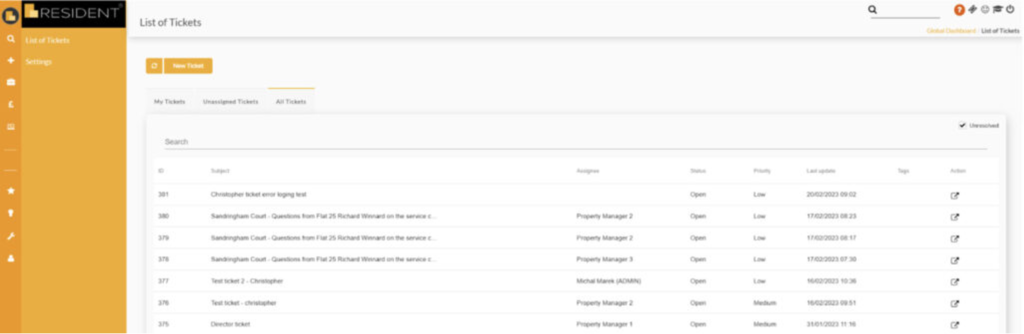
    To start, let’s visualise the main dashboard of the Ticketing module:

    Imagine the most organised to-do list at your fingertips. You can easily see tickets assigned to you, pending assignments, and those assigned to your colleagues – ideal for managing workloads, especially when team members are out of the office.

    The module also features a powerful keyword search, allowing you to locate tickets swiftly. You can tag tickets by block name or issue type and prioritise them using the Grade feature.

    How Integrated Is Ticketing?

    The answer? Completely integrated!

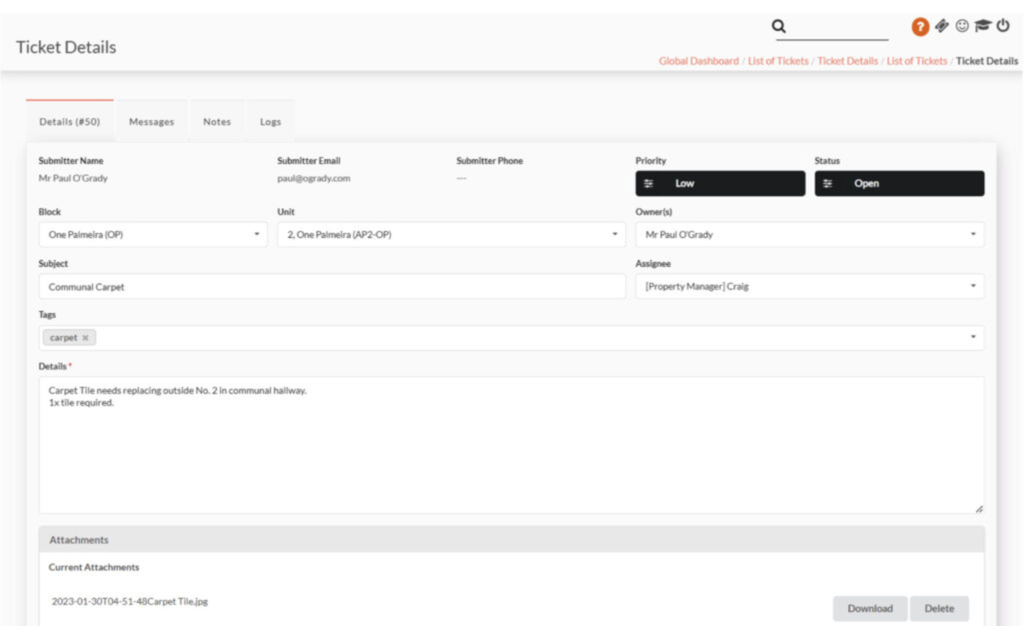
    Leaseholders or Directors can submit tickets via email, the online portal, or directly from your website, and all requests will seamlessly populate within the Ticketing system. If the submitter’s email matches a registered account in Resident, their block, unit, and owner information will automatically populate. Plus, the system will capture their contact details and any files they attach to their initial request.

    Additional Features of Ticketing

    Here’s a snapshot of what Ticketing has to offer:

    • Assign Tickets: Delegate tasks to team members effortlessly.
    • Automatic Notifications: Get alerted when new tickets are received or assigned to you.
    • Weekly Status Reports: Stay updated on progress and outstanding issues.
    • Create Work Orders: Link work orders back to specific tickets for easy status updates.
    • Task Creation: Never lose sight of important tasks related to a ticket.
    • Two-Way Messaging: Communicate directly with ticket reporters, keeping all correspondence logged within the ticket.
    • Individual Ticket Tracking: Access all tickets raised by a specific leaseholder under their Ownership Details tab.
    • Internal Notes: Make notes visible only to you and your colleagues.
    • Merge Tickets: Combine reports of similar issues, like a shared broken lift.
    • Audit Trail: View a comprehensive log of actions taken on each ticket, providing clarity and accountability.

    The Ticketing module is a game-changer for managing the often hectic demands of Block Management. If you’re interested in learning more about how it can transform your operations, we’d love to discuss it with you in detail.

    Thank you for your time, and I look forward to connecting with you soon!

    To help gain a deeper understanding of all things Ticketing, please feel free to check out the Video Demonstration by clicking the link!


    So, if you wish to learn more then please reach out to me directly: 
  • Save 30% of the ‘snail mail’ budget

    Save 30% of the ‘snail mail’ budget

    Hi again, it’s Craig, Resident’s Client Success Manager 👋🏼

    Did you know that on average you could be saving up to 30% on your postal costs?

    Resident has a plethora of free messaging tools built-in to help you save time and money. We offer you the ability to send Mail Merges, 1-2-1 Messaging, Group Messaging (selecting Leaseholders/Directors/Tenants in a given block and also creating Custom Groups), Service Charge Demands*, Ground Rent Invoices, Supplementary Demands, Automated Arrears Processes…  to name just some.


    *subject to obtaining necessary written consent

    Your preferences and theirs, aligned:

    Have certain leaseholders who have preferences of what they are happy to receive by email and what they aren’t? No problem…

    You can simply click a preference and they will be automatically included/removed from those instances. Better yet, those that opted out of email, can be immediately identified and downloaded, ready to post…

    Flexibility:

    The environments in which people are working are ever changing.
    No longer will you need to be physically in the office in order to get important letters posted out.

    Due to Resident being cloud-based, all of our messaging tools can be accessed from absolutely anywhere, at any time.

    Environmentally conscious:

    Kinder on the bottom line and the environment, too.

    Everything does use energy however, and for the 20 grams of CO₂ it takes to send a single letter – 67 emails can be sent instead.

    As mentioned, all of the above is free of charge.

    If you fancy dipping your toe into other ways in which you can utilise messaging and improve the service you provide, then feel free to click the below links to learn more:

    Integrated Email your email synced with Resident, say goodbye to no-reply

    Ticketing Moduleno more being drowned in maintenance issues

    If any of what I have mentioned has left you wanting to learn more,  then please reach out to me directly: craig@resident.uk.com
  • My first 30 Days at Resident

    My first 30 Days at Resident

    Hi, I’m Caitlin and I’m the new onboarding specialist at Resident

    It’s hard to believe my first month at Resident has already come and gone!

    As an onboarding specialist, my role is to guide new clients through the onboarding process and introduce them to everything our software has to offer. Alongside that, I provide paid training to existing clients, helping them strengthen their understanding and maximise the software’s potential.

    Since I’ve been working remotely for almost 3 years now, the transition to this remote based role felt seamless. (With the exception of the delivery of my equipment thanks to DPD!) However, what truly stands out about Resident is how small and close-knit the company is. I’ve worked for larger organisations in the past, but being part of such a tight team has been a breath of fresh air. Everyone is incredibly friendly, and from day one, I felt genuinely welcomed into the Resident family.

    The most interesting part of my onboarding was experiencing the same process I now teach to new clients! It was a little surreal to be on the receiving end, learning all the ins and outs of Resident’s software, knowing soon I’d be guiding others through the same journey. Overall, my onboarding experience was enjoyable each day, largely thanks to my manager; Craig, who has been a fantastic mentor and has truly been virtually by my side for every step!

    One of the highlights from my first month has been leading my first few onboarding sessions. In my previous role, I often provided client sessions, teaching them everything they needed to know and walking them through any dilemmas. However, block management was completely new to me, which made this experience both challenging and exciting. Needless to say, I enjoy speaking with people, which is what drew me to this role – the opportunity to do more of what I truly love. Now the end of my first 30 days is here, I already feel like my sessions have improved greatly compared to where I started. It’s been invaluable to have Craig to discuss ideas with and learn from, particularly how he approaches onboarding. It’s a massive benefit to have a manager who knows your role inside out and can offer real insights for positive changes.

    Overall, I’m loving the opportunity to connect with both new and existing clients, help them navigate Resident’s software, and be part of such a great and supportive team. I can’t wait to see what the next 30 days (and beyond) bring!

  • Let’s talk Integrated Email

    Let’s talk Integrated Email

    Hi again, it’s Craig, Resident’s Client Success Manager

    As you know, when you currently send any emails from Resident (other than our Ticketing module), they are sent via a noreply@resident email address.


    In the background we have been working hard to offer a way of integrating a Clients own domain email address into Resident, this meaning that:


    • You will be able to have your own company email address visible

    • You will be able to send and receive emails from this email address in Resident

    • You will be able to see replies in a Global Inbox on your Resident dashboard

    • All Agents will be able to see the inbox and be able to reply


    Better yet, we’re not stopping there. We are continuing to develop and test even more features; such as: whitelisting, custom signatures and ‘grouping’ by recipient (seeing all messages sent to that person on their ‘profile’).


    If you would like to add this feature to your dashboard, then you’ll be pleased to know that instead of increasing your subscription value – all it takes is a one off set up cost of £250 + VAT. 


    If this is something you wish to add to the service you offer your clients, it’s as easy as 1,2,3:


    1. Email me at craig@resident.uk.com with the one email address you would like to sync, such as info@ etc

    2. I shall reply with an invoice for the above costs

    3. Once paid we shall schedule your set-up process and notify you once completed with any supplementary information


    Early indications are that we will have to offer longer turnaround times as we see more Clients ‘Opt In’. Therefore, if this is something you wish to do – let me know as soon as you can!


    I look forward to hearing back from you as soon as you are able!

  • Client Testimonial – Gordon Estates

    Client Testimonial – Gordon Estates


    Hi again, it’s Craig, Resident’s Client Success Manager 👋🏼

    We are delighted to share some insights with one of our Clients who have been using Resident for the last 8 years and have achieved some phenomenal growth.

    Now managing in excess of 5000 units, here is a little bit about them…

    Gordon Estates – Northern Ireland

    Gordon Estates has flourished as Northern Ireland’s top open space and block management agency, excelling in the management of residential estates and communal spaces. With a growing portfolio, Managing Director Christopher Gordon attributes their success to their relentless focus on monitoring and improving their clients’ experiences.

    It’s the most effective way to ensure we always deliver exceptional service. Our processes must be transparent and the team must be accessible. It’s key to professional property management

    Gordon Estates was looking for a block management software solution that was built as much for owners and developers as it was for property managers.

    We didn’t just want an online admin system for our staff. We realised that the right property management software would give us the opportunity to further engage and communicate with our clients wherever we or our clients are

    With an intuitive and user-friendly interface, Resident’s cloud-based software can be accessed from any device.  So whether via laptop, tablet or mobile phone the Gordon team can easily share important information and documentation with their clients. 

    As block managers we’re responsible for maintaining and enhancing the fabric, amenities and services of all the 64 developments that we have been appointed on. With Resident we can set reminders for any works or safety checks, provide clarity on budgets and estimated costs and communicate project timescales. When we were looking at different software options it was clear to me that Resident was built for the most important end user, the resident. That level of transparency is key for us

    Resident is fully scalable and as Gordon Estates continues to expand our cutting-edge software will support their operations and help them to deliver their committed, client focused block management services.

    If you are interested in learning more about joining Resident, reach out to us today – hello@resident.uk.com. Or, if you are an existing Client of ours and want to learn more about additional ways to maximise your growth – we’d love to hear from you too and share some exciting modules!

    Thanks for stopping by! 😊

  • Annual Leave Handover: do you have one?

    Annual Leave Handover: do you have one?

    Hi again, it’s Craig, Resident’s Client Success Manager 👋🏼

    I am back to talk to you about a new possible way to utilise the functions already on Resident, to improve the quality of handovers between colleagues, at your workplace.

    Let’s face it, we’ve all been on the receiving end of ‘the worst handover of all time’.
    Your colleague skips out the door, with all the reassurance in the world that ‘everything is in the notes’ and ‘I doubt anything will happen, but if it does, it’s all there for you – in the notes’.

    It’s never in the notes. Well, at least not always to the extent that will ‘save your bacon’, there and then.

    So what are we covering today?

    Trying to get to a world where we don’t wholesomely have to ‘live in the notes’ of a handover, we are going to be exploring the ways in which we can use the tasks, assessments and insurance areas of Resident to keep us on track. When we’re either at our desks or at the pool bar.

    We shall firstly take the Point Of View of the person who is ordinarily assigned to the block and is soon to be heading off on Annual Leave. They shall be Green topics, and those in Amber are for those ‘looking after the block’ in their absence.

    Assessments:

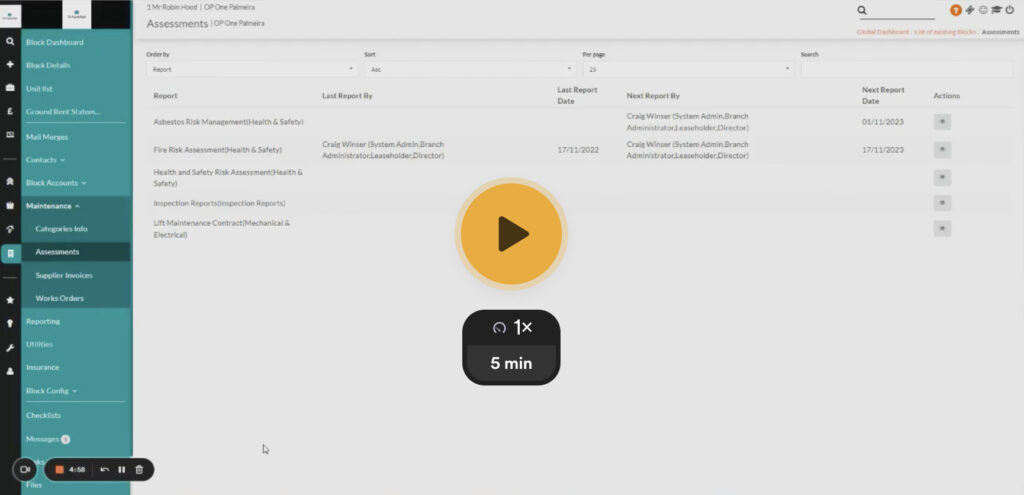
    This area is a place dedicated to your Cyclical Tasks. They could be anything from Fire Risk Assessments, right the way through to a Lift Maintenance Contract.

    In principle, these are your ‘non-negotiables’, that without question have to be completed/renewed/etc on time, everytime – no question!

    If you are not using this area on your Resident dashboard – you are really missing out from having an easier and less anxious time at work.

    If you ever have an audit, this is an area that will ensure you can quickly and confidently showcase that you are compliant.

    Now, if this is new to you or you want to be sure you are using these to the best of your ability – then please feel free to check out the video below. I talk in depth about how you can set the tasks to appear year after year, attach files, set reminders and more!


    Insurance:

    A lot like with Assessments, Insurance is an area that if you are not currently utilising on Resident, then this is definitely something to implement this year.

    Be it your Public Liability Insurance all the way through to Cladding Insurance – there are so many to keep track of, that we believe its paramount that this is all stored, actioned and reported all in one place.

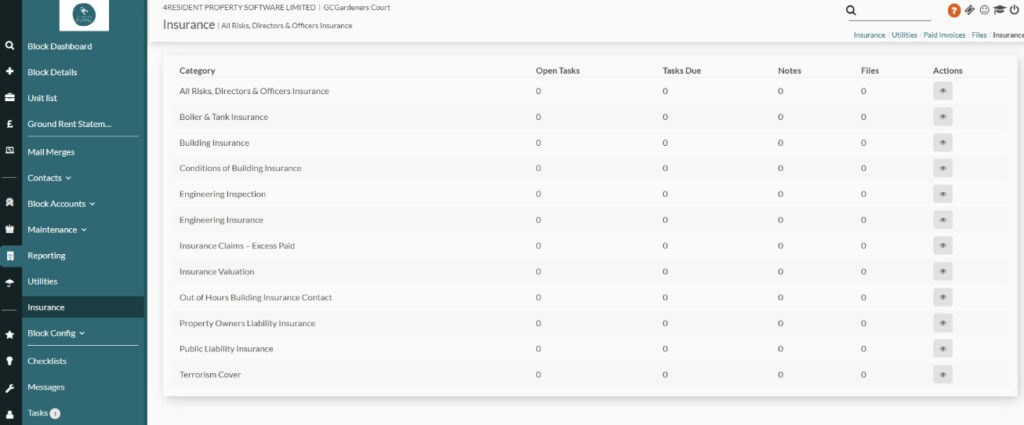
    The Insurance area on Resident allows you to store all previous years Files; such as certificates and policies, set tasks, reminders and even keep track of associated invoices!

    Whilst the setting up of tasks and the adding of files holds the same principles covered in the above video, this following link covers off the remaining differences.


    Reporting:

    Now we’re all aware of Reporting in Resident to some extent, but have you ever utilised it to become the bedrock of your Annual Leave Handover?

    In my view, if you have spent the time illustrating all of your Tasks, Assessments and Insurances onto Resident (as mentioned above), you should now be rewarded by running a report and having your handover ‘to-do list’ created for you!

    The below video talks about this exact scenario. 

    Once you have generated and filtered the correct report, why not save it, write your colleague an email with your ‘contextual notes’ – but now simply attach your report. 

    This will consist of all of your Tasks (that span your day-to-day tasks, all of your non-negotiable Assessments and even your Insurance tasks too).


    Ad-Hoc Tasks:

    Whilst you are looking after your colleagues Block for them, don’t forget to make use of adding one-off tasks on any specific entity, for them to pick up when they are back.

    This can be by adding a Task on the Block, a Leaseholder, Director, Supplier – almost every aspect of Resident.

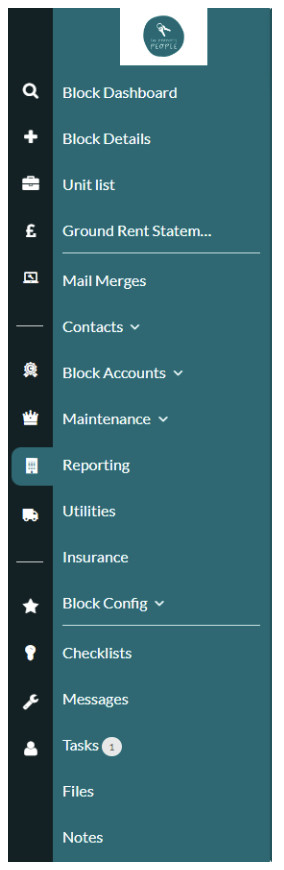
    Notice on the Menu Tasks are found in most places; as are Notes and this is a great way in assisting your colleagues for when they return to work.


    Just be sure to Assign the task to your colleague who is on Annual Leave and set it for a date when they are back – then it will appear in their MyWork Tasks when they are back!

    The videos above will already have covered everything you need to know about Tasks in general, but for anything else – see this article below, for more information.

    Thanks for stopping by and we hope this helps you & your teams! 😊